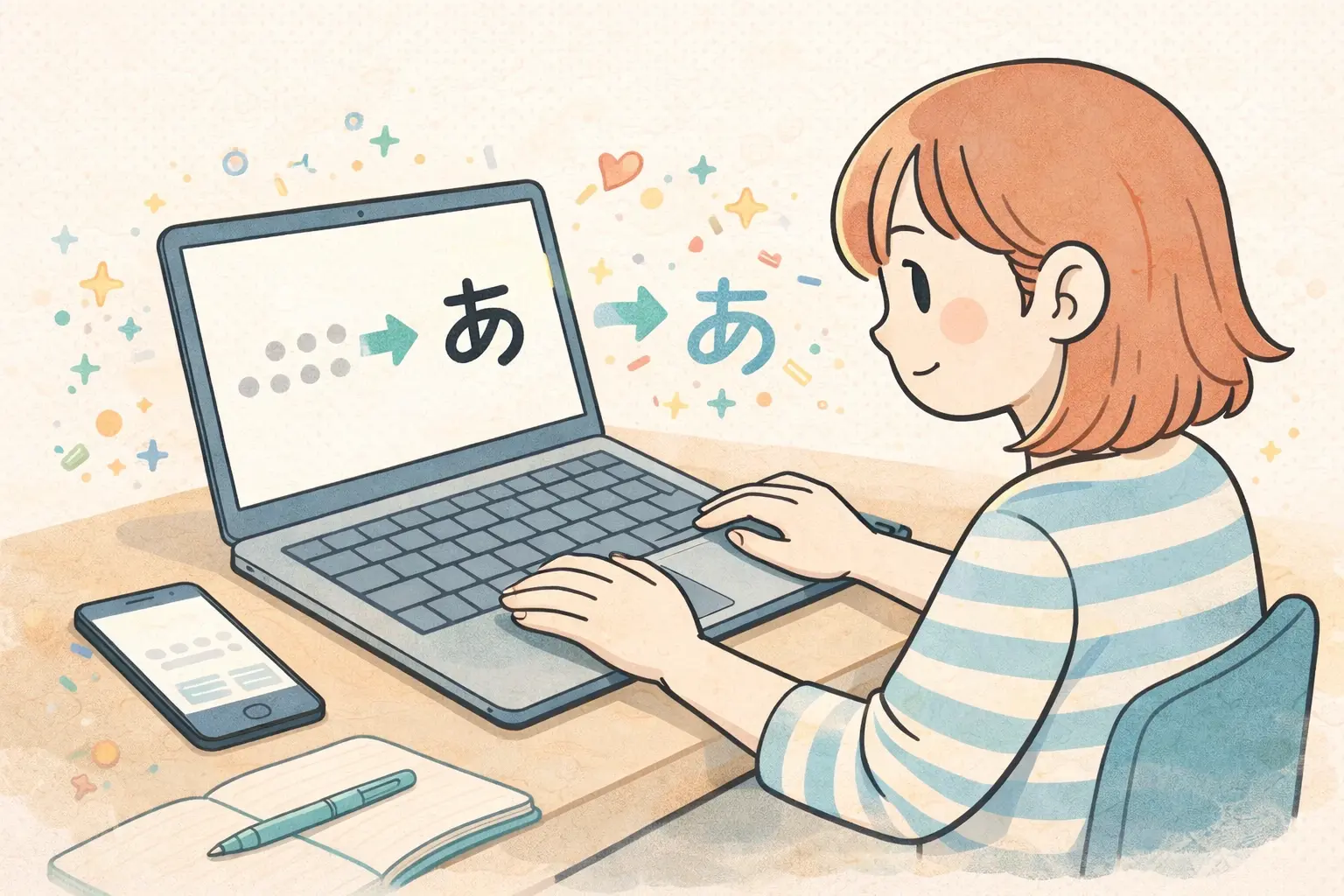
So you want to learn how to type in Japanese. You’ve installed your Japanese keyboard, you hit a few keys — and suddenly romaji is morphing into hiragana or katakana, a dropdown box appears, and nothing makes sense.
Don’t worry. Typing in Japanese is easier than it looks once you understand the logic behind it. In fact, if you already know some romaji, you’re most of the way there.
This guide covers everything: hiragana input, katakana input, kanji conversion, punctuation, symbols, and even kaomoji. By the time you finish, you’ll be typing Japanese without thinking twice.
Before you start, make sure your Japanese keyboard or IME is already enabled on your device. If it isn’t, set that up first — then come back here.
How to Use This Guide
Before you begin, make sure your Japanese keyboard is enabled. If you don’t have one set up yet or aren’t sure how to install it on your device, follow our step-by-step guide to installing a Japanese IME before continuing.
The tables below show a Japanese character on top and the romaji input you type to produce it directly below. For example, to type あ, you type a. Simple as that.
Romaji knowledge makes this much easier. Because Japanese words have standard romaji spellings, you can type almost any word just by spelling it out in romaji and letting the IME do the rest.
One thing to keep in mind: two common romanization systems exist — Hepburn and Nihon-shiki. Therefore, some characters have two valid inputs. Both options appear in the tables below wherever they apply.
How to Type Hiragana
Hiragana is the first script your IME produces when you start typing. Here’s the full input chart:
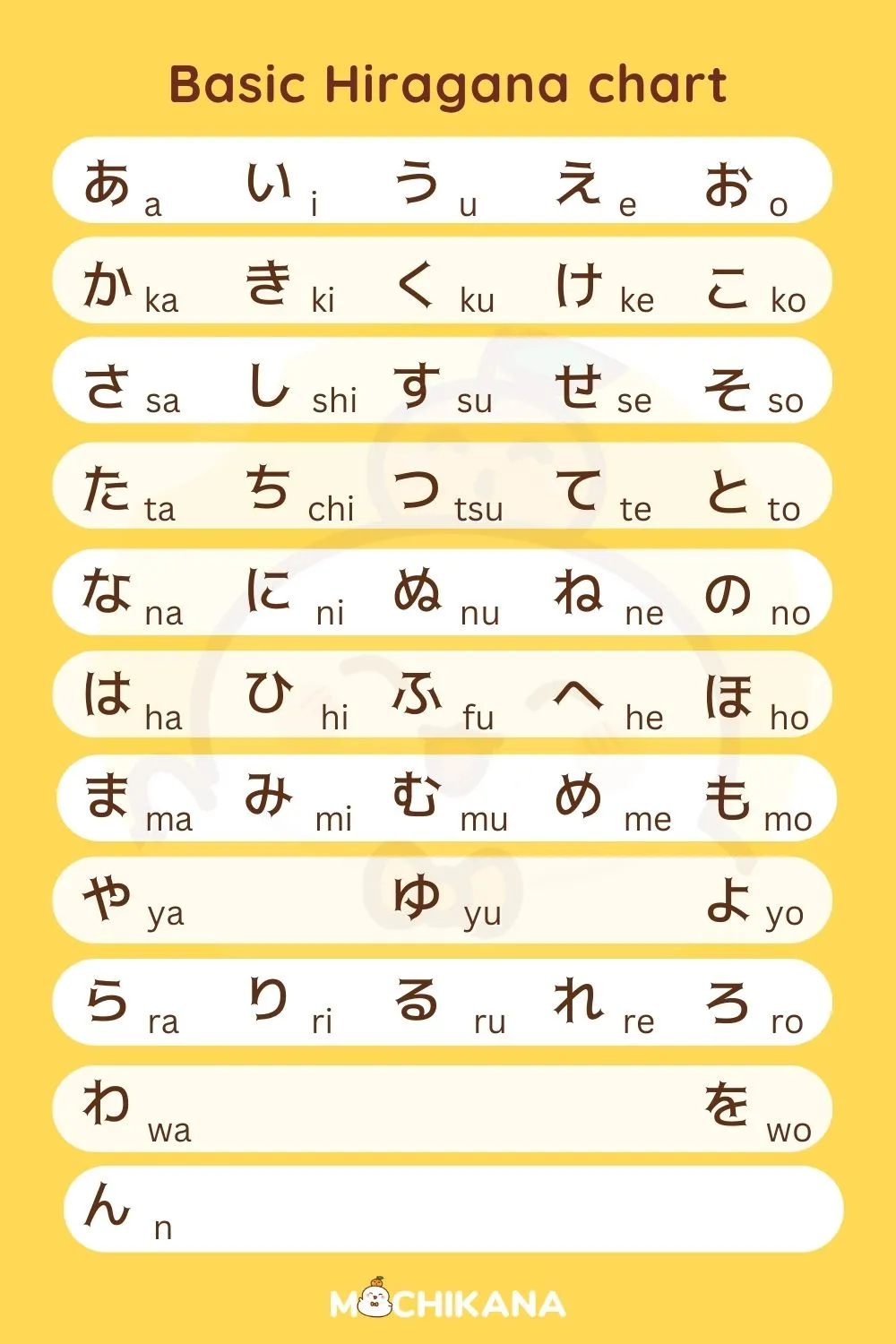
Source: MochiKana
Two things to note:
First, ん requires you to type nn — not just n. When you type a single n, the IME waits to see if you’ll follow it with a vowel to make な、に、ぬ、ね、or の. So you need that second n to confirm you want ん. The difference matters:
- おな → ona
- おんあ → onna
- おんな → onnna
Second, the particle は is typed as ha — even though it’s pronounced wa in a sentence.
Hiragana Dakuten (Voiced Sounds)
Dakuten (゛) voices the base consonant. To produce these, type the voiced romaji directly:
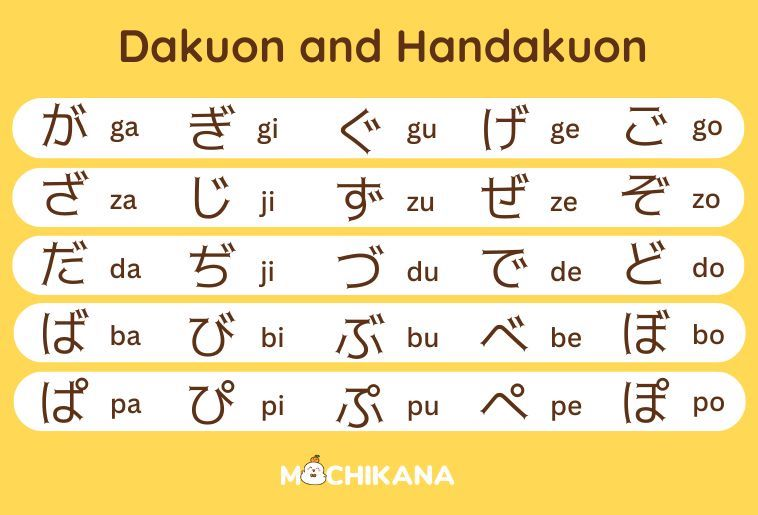
Source: MochiKana
Note: じ accepts both zi and ji. Similarly, ぢ accepts di and づ accepts du.
Hiragana Combinations (Contractions)
Combination characters are typed by combining the consonant row with ya, yu, or yo:
| Contractions | Dakuten Contractions |
| きゃ きゅ きょ = kya kyu kyo しゃ しゅ しょ = sha shu sho ちゃ ちゅ ちょ = cha chu cho にゃ にゅ にょ = nya nyu nyo ひゃ ひゅ ひょ = hya hyu hyo みゃ みゅ みょ = mya myu myo りゃ りゅ りょ = rya ryu ryo | ぎゃ ぎゅ ぎょ = gya gyu gyo じゃ じゅ じょ = ja ju jo (also jya jyu jyo) びゃ びゅ びょ = bya byu byo ぴゃ ぴゅ ぴょ = pya pyu pyo |
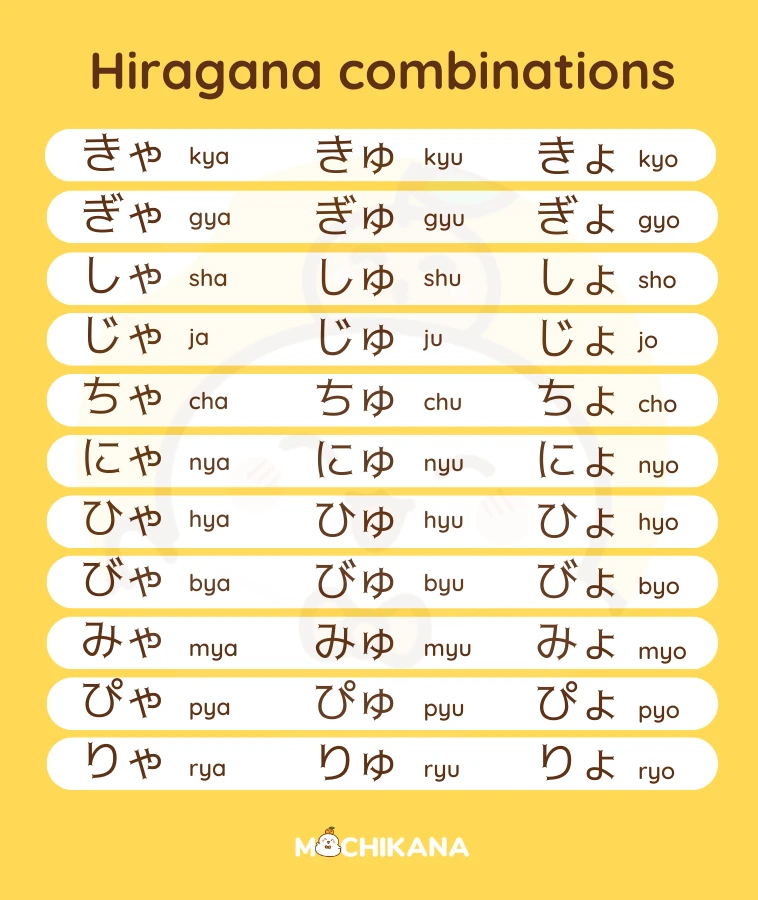
Source: MochiKana
| Long Contractions | Dakuten Long Contractions |
| Some combination sounds carry an extended vowel — held for one extra beat. To type these, simply add u at the end of the combination input. Your IME handles the rest. | The same long vowel rule applies to voiced combinations. Therefore, just add u at the end of the voiced combination input: |
| きゅう きょう = kyuu kyou しゅう しょう = shuu shou ちゅう ちょう = chuu chou にゅう にょう = nyuu nyou ひゅう ひょう = hyuu hyou みゅう みょう = myuu myou りゅう りょう = ryuu ryou | ぎゅう ぎょう = gyuu gyou じゅう じょう = juu jou (also jyuu jyou) びゅう びょう = byuu byou ぴゅう ぴょう = pyuu pyou |
How to Type Katakana
Here’s the good news: you don’t need to learn a separate input system for katakana. Instead, type the word in hiragana first — then hit the spacebar. Your IME will almost always suggest the katakana version as one of the first options.
If it doesn’t appear immediately, keep hitting the spacebar to scroll through the dropdown until you find it. Additionally, you can check the official spelling using an online dictionary like Jisho if you’re unsure.
The input table for katakana is identical to hiragana — same romaji, same logic:
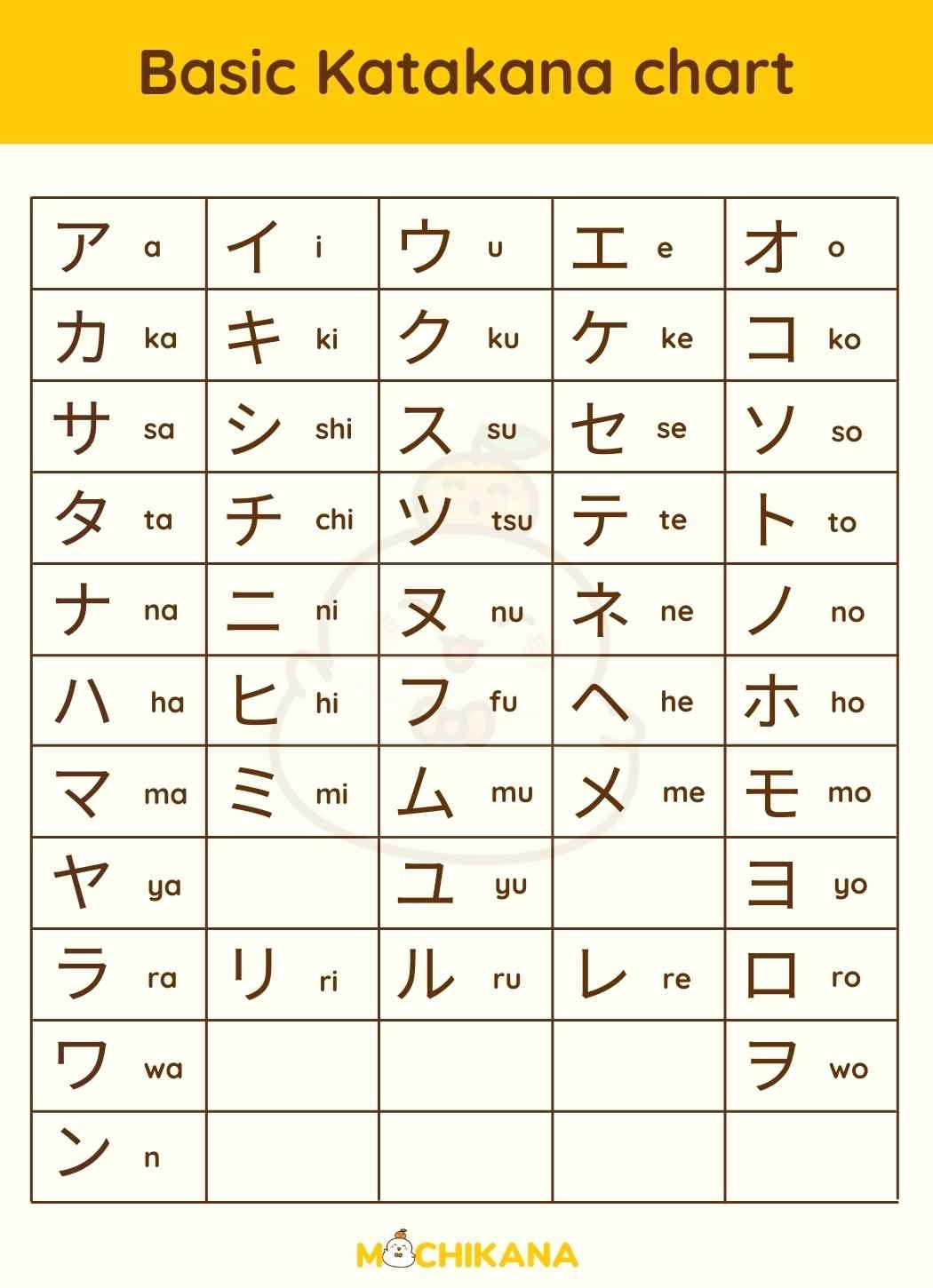
Source: MochiKana
Katakana Dakuten and Combinations
Because katakana handles loanwords, it goes further than hiragana. In addition to the standard voiced sounds and combinations, katakana includes extra inputs for foreign sounds that don’t exist in native Japanese:
F-sounds (フ + small vowel): ファ フィ フェ フォ = fa fi fe fo
V-sounds (ヴ + small vowel): ヴァ ヴィ ヴェ ヴォ = va vi ve vo
W-sounds (ウ + small vowel): ウィ ウェ ウォ = wi we who
T and D sounds: ティ ディ = texi dexi
TS-sounds:ツァ ツィ ツェ ツォ = tsa tsi tse tso
Other foreign combos: チェ シェ ジェ = che she je
How to Type Small Characters
Small Tsu (っ/ッ)
You don’t need a special shortcut for small tsu. Instead, just double the consonant that follows it in romaji. Your IME handles the rest automatically.
For example:
- やった → yatta
- きっと → kitto
- みっつ → mittsu
- まっちゃ → maccha
This works because っ marks a geminate consonant — a doubled sound. Therefore, doubling the romaji letter tells the IME exactly what you mean.
Other Small Characters (ぁぃぅぇぉ)
For small vowels used in casual writing or foreign sound combinations, type l or x before the vowel:
- ぁ = la/xa
- ぃ = li/xi
- ぅ = lu/xu
- ぇ = le/xe
- ぉ = lo/xo
How to Convert to Kanji
Once you can type hiragana and katakana, you will be able to convert it to kanji. The process is straightforward — and with practice, it becomes completely automatic.
Here’s how it works step by step:
- Step 1: Type your sentence in hiragana. For example: わたしのなまえはクリステンです → watashinonamaehakurisutenndesu
- Step 2: Hit the spacebar. A dropdown box appears with conversion options.
- Step 3: Scroll through the options and select the kanji you want. Then hit Enter to confirm.
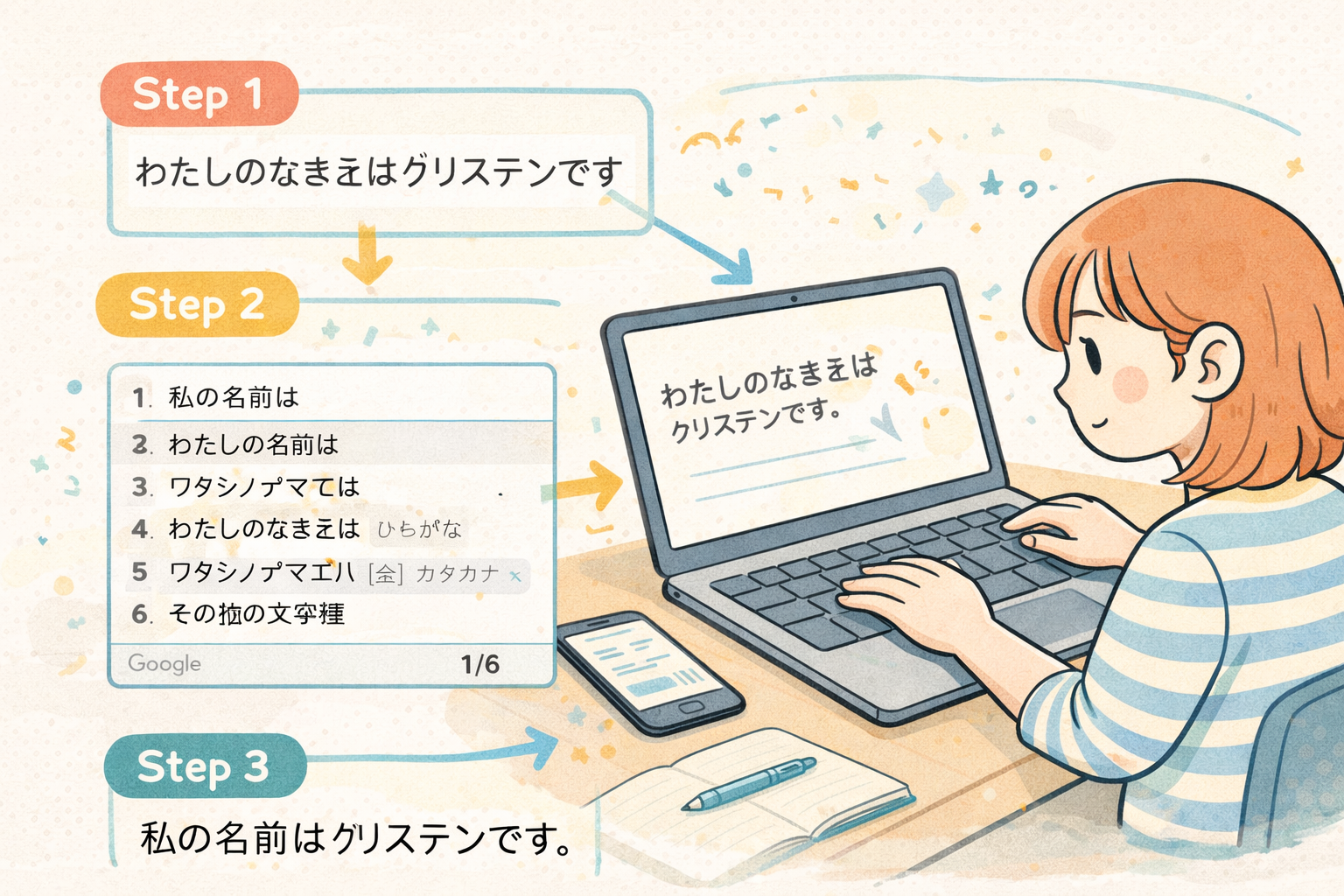
What if you picked the wrong kanji? Use the arrow keys to highlight the specific part of the sentence you want to change. Then hit the spacebar again to cycle through the options for that word only.
What if you scrolled too far? Hit the Escape key once to revert back to the original kana. Just once — hitting it twice deletes what you wrote.
This process takes some getting used to. However, once you’ve done it a few times, toggling through conversions becomes second nature.
How to Type Japanese Punctuation
You don’t need a physical Japanese keyboard for punctuation. Instead, these standard keyboard inputs produce the correct Japanese punctuation marks:
| Japanese | Input | Japanese | Input |
|---|---|---|---|
| 。(period) | . | ・(middle dot) | / |
| 、(comma) | , | ー(long vowel mark) | – |
| 「」(quotes) | [ ] | ¥(yen sign) | \ |
| 〜(wave dash) | shift + ~ |
How to Type Japanese Symbols
Beyond punctuation, your Japanese keyboard holds a surprisingly large number of symbols. Some are typed directly. Others require typing a Japanese word and scrolling through the IME dropdown.
Direct shortcuts (Google IME):
| ← | ↓ | ↑ | → |
|---|---|---|---|
| zh | zj | zk | zl |
These extra bits of punctuation work with Google IME,
| 〜 | ‥ | … |
|---|---|---|
| z- | z, | z. |
| ・ | 『 | 』 |
|---|---|---|
| z/ | z[ | z] |
Note: these shortcuts work with Google IME but not MacOS IME.
Word-based symbols — type the word below and scroll through options:
| Word | Input | Options | Word | Input | Options |
|---|---|---|---|---|---|
| Circle | maru | ○ ◎ ◯ 。゜ | Weather | tenki | ☀ ☁ ☂ ☃ |
| Triangle | sankaku | ▲ △ ▼ ∴ ⊿ | Music | ongaku | ♪ ♫ ♬ ♭ ♯ |
| Star | hoshi | ☆ ★ ✪ * | Heart | haato | ♡ ♥ ❤ ❥ ❦ |
How to Type Old Kana (Kobun)
If you’re studying Classical Japanese, you’ll occasionally need characters that modern IMEs try to autocorrect away. Here’s how to type the most common ones:
ゐ ヰ = wi ゑ ヱ = we
Your IME will resist these — because it assumes you want うぃ instead. Therefore, use your spacebar toggle to scroll past the modern suggestions until you find the classical character.
For the rarest old characters like ゟ (yori) and ヿ (koto), ゟ should appear in most IMEs. However, ヿ may require a copy/paste from a Unicode source — especially on non-Windows systems.
How to Type Kaomoji
Here’s the part nobody tells you about: your Japanese keyboard has kaomoji built right in.
To access them, simply type かおもじ and scroll through the IME dropdown. You’ll find a solid range of expressions without needing any external app or copy/paste tool.
Additionally, some emotional words trigger relevant kaomoji options automatically as you type:
うれしい (ureshii = happy) → (≧▽≦) ((o(´∀`)o)) おいしい (oishii = delicious) → (๑´ڡ๑) にこにこ (nikoniko` = smiling) → (●´ω`●)
You can also type kao to browse face-based options, or emoji if you want those instead. Though honestly — kaomoji are better.
What’s Next
Now you know how to type in Japanese. However, typing speed only gets you so far — reading speed is what actually lets you function in the language.
If you’re still building your foundation, our learning guide walks you through every character using mnemonics and active recall — the fastest way to make kana recognition automatic.
Once you’re reading comfortably, MochiKana takes you further with spaced repetition review built around your schedule. And when you’re ready for the next level, learning Kanji is where Japanese really opens up.
The sooner you start reading, the sooner typing Japanese starts to feel like second nature.